Opinion

HDRP: Its application in the Negroponte Home project

By admin on febrero 17, 2021 45 Comments

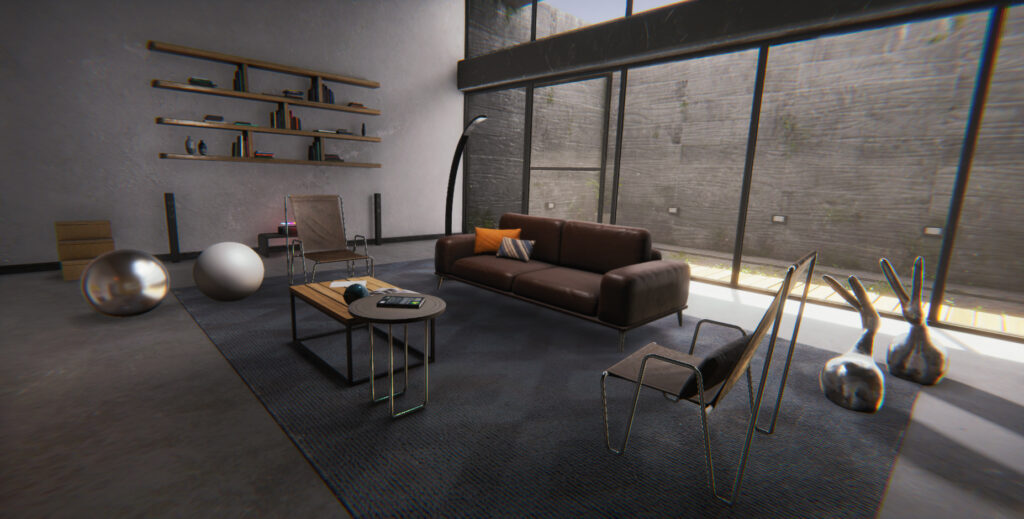
hdrp Nicholas Negroponte exterior
hdrp Nicholas Negroponte interior

At the beginning of 2020, Unity finally and officially integrated the HDRP High-Definition Rendering Channel. Excellent news for all video game lovers and developers who use this engine. Next, we will talk about our pleasant experience with the use of this tool in the Negroponte Home project (an architectural environment in virtual reality) using version 2019.3.1. We will explain a little about the environment adjustments with the Global Volume tool, light and shadow adjustments, and finally its integration with Substance Painter for the development of materials.

Global Volume

The base setting for lighting in HDRP is through Global Volume, which allows us to load images in HDR for direct and indirect incidence on the lighting of the entire scene. Having to be adjusted proportionally with the Exposure (exposure) of the HDR on the scene, and the Fixed parameter, which in our case, gives us a higher contrast of the image output levels.

To generate changes in tone on the HDR, emulating a twilight or simply simulating a camera filter, it is beneficial to use an image editor such as Photoshop with Photographic Filter adjustment, because in this way, faster results will be achieved and with better control about HDR.

An element that generates depth in the scene and also helps to associate the different objects in it, is the Fog option, and not only for large and wide environments, but also in small spaces. It is critical to match the color of the Fog with the incidence of the overall HDR color.

Finally, and in a similar way to a photographic retouching process, in HDRP an adjustment of color or Color Curves is performed to generate more contrast between the tones and their black and white levels, thus highlighting shadows and highlights either in a general or specific color channels.  

Lights and shadows

The workflow for integrating lights into an environment in Unity is similar to the flow of any 3D modeling package like Maya or Blender. After the HDR base setting, lights are integrated, in our case a Directional Light that emulates the Sun. From this light, which has a higher incidence, the shadows are projected by adjusting the Resolution (shadow resolution) to 2048 * 2048 and blurring with the Normal Bias.  

The use of Area Lights allows us to blur and emulate the attenuation of natural light when entering a closed space, thinking that it will be lighter as it approaches the window and darker if it moves away from it. Also, Area Light allows us to emulate a bounce of light to illuminate specific areas in order to have a clearer environment. In our case, the shadows of these lights were deactivated since they are a reinforcement to the global illumination.  

The Light Layers adjustment provides us with an ideal solution to isolate specific points to be illuminated, or also to highlight them in case the initial light adjustment is not enough. In the Negroponte Home project, Light Layers is applied to metallic objects such as beams.  

Materials with Substance Painter

A program that has made our lives easier is undoubtedly Substance Painter, which gives us ease and power when creating different materials and shaders. In addition, its integration with Unity  allows an optimal and agile workflow.  

When creating materials, it is important to define their response to light, in this case being an architectural environment, the analysis of real objects is important. The previous assembly of a moodboard allows us to better organize the materials to be used for the subsequent adjustment of the specular, reflective, refraction and / or roughness level.  
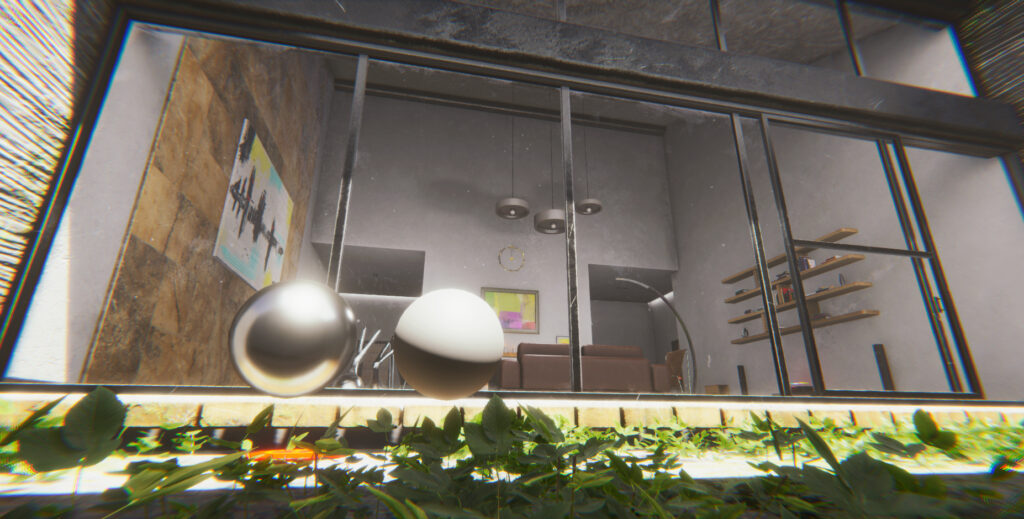
Although in Unity there are parameters for the adjustment of the Ambient Occlussion or AO a greater contrast can be given from the same Substance Painter by generating a Fill Layer (solid layer) with the AO map created at the initial moment of baking of all the object maps, and merge it using the Multiply blending mode.  

As of the Substance Painter 2020.1 release, there are HDRP Material Export Presets that save us time when exporting texture maps.

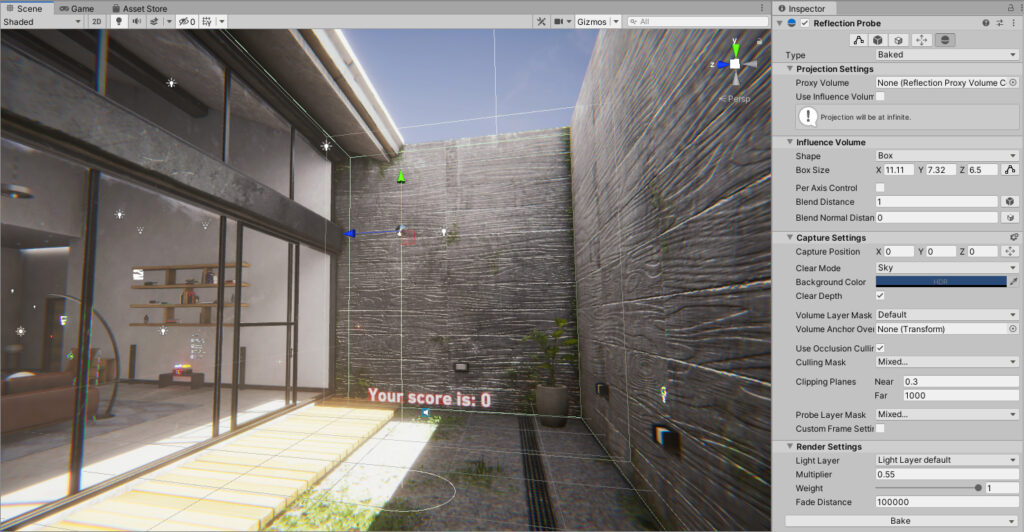
Once all the texture maps have been imported into Unity, the materials are created to integrate each of the textures. It is important to check the incidence of light in the scene on the different materials and to integrate the Reflection Probe around the reflective objects, since its visualization can differ drastically in Unity, and sometimes it is mistakenly deduced that Substance Painter exported wrongly maps. To correct the behavior of materials in light of light, the levels of Smoothness Remapping and Ambient Occlussion Remapping must also be adjusted.  

Reflection Probes

Conclusion

In conclusion, the HDRP High-Definition Rendering Channel has all the necessary features to generate hyper-realistic environments with a varied set of settings and possibilities. And best of all, it offers a wide variety of solutions for the different needs of the industry, from the realization of simple flow projects, to the development of AAA games.

And although some adjustments are missing to be integrated that will surely do so in the new versions, our experience in Negroponte Home with the HDRP High-Definition Rendering Channel, allows us to highly recommend the use of this tool that has marked a before and after in the development of interactive digital systems.  

  1. ursodiol medication

    ursodiol medication

  2. metoprolol tartrate

    metoprolol tartrate

  3. lasix furosemide 40 mg

    lasix furosemide 40 mg

  4. ivermectin for horses

    ivermectin for horses

  5. finasteride proscar

    finasteride proscar

  6. doxycycline hyclate 100 mg capsule

    doxycycline hyclate 100 mg capsule

  7. mirtazapine for anxiety

    mirtazapine for anxiety

  8. fluconazole tablet

    fluconazole tablet

  9. tetracycline hydrochloride cream

    tetracycline hydrochloride cream

  10. antibiotics online purchase

    antibiotics online purchase

  11. allopurinol gout

    allopurinol gout

  12. vibramycin medication

    vibramycin medication

  13. doxycycline hyclate for acne

    doxycycline hyclate for acne

  14. lamictal weight gain

    lamictal weight gain

  15. diflucan over the counter spain

    diflucan over the counter spain

  16. lasix furosemide 20 mg

    lasix furosemide 20 mg

  17. antibiotic doryx

    antibiotic doryx

  18. macrobid 100mg

    macrobid 100mg

  19. lasix injection

    lasix injection

  20. nexium tablets

    nexium tablets

  21. tadalafil commercial name

    tadalafil commercial name

  22. sildenafil fertility

    sildenafil fertility

  23. cialis generic online

    cialis generic online

  24. voriconazole dosing weight

    voriconazole dosing weight

  25. orlistat otc australia

    orlistat otc australia

  26. cialis online us

    cialis online us

  27. viagra color perception

    viagra color perception

  28. cenforce 200mg black pill

    cenforce 200mg black pill

  29. cenforce review reddit

    cenforce review reddit

  30. does cenforce 100 work

    does cenforce 100 work

  31. what is cenforce 50

    what is cenforce 50

  32. cyclosporine vernal keratoconjunctivitis

    cyclosporine vernal keratoconjunctivitis

  33. levitra ingredients

    levitra ingredients

  34. famotidine max dosing

    famotidine max dosing

Leave a comment to allopurinol gout

Tu dirección de correo electrónico no será publicada. Los campos obligatorios están marcados con *